
آموزش ساخت اسکرول زیبا با جی کوئری

بکمک این کد میتوانید در هر کجایی از وب سایت خود یک اسکرولر زیبا داشته باشید . همچنین میتوانید برای هر dIV یک استایل جدا تعریف کنید . کافیست نام DIV یا ID مد نظر را در این اسکریپت قرار دهید .
نمونه این اسکرول زیبا را در صفحه نخست سایت ما مشاهده نمایید . براحتی میتوانید تمامی مشخصات اسکرول را عوض کنید . تغییر موقعیت ، تغییر عرض ، حالت روح ، انواع حالت های Hover موس ، تنظیم سرعت جابجایی ، لبه گرد کردن ؛ تنظیم مقدار حرکت با هر پایین رفتن و … از برخی ویژگیهای این اسکریپت میباشد .
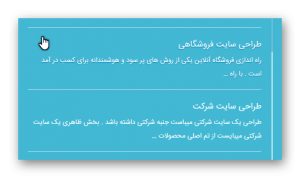
ابتدا میبایست کد های جاوای زیر را از مرجع اصلی دانلود نمایید و در هاست خود آپلود نمایید . و آنها را در جایی که میخواهید اسکرول بار زیبا شود آدرس دهی کنید .
<script type="text/javascript" src="http://yourdomin.com/js/jquery.js"></script>
<script type="text/javascript" src="http://yourdomin.com/js/jquery.nicescroll.min.js"></script>
( برای دانلود فایل های بالا از پایین صفحه اقدام بفرمایید )
حالا میبایست کد زیر را در مکان مد نظر کپی کنید .
    <script type="text/javascript">
 $(document).ready(
function() {
                $(".testnamediv").niceScroll({
                    cursorcolor:"#ffffff",
                    background:"#8CC0D1",
                    cursorwidth: 2 ,
                    cursorborder: "0px solid #dcdcdc" ,
                    cursorborderradius: 0 ,
                    scrollspeed: 300 ,
                    mousescrollstep: 10 ,
                    sensitiverail : true ,
                    autohidemode : true
                });
            }
        );
    </script>
در کد بالا میبایست بجای .testnamediv نام div مورد نظر خود را قرار دهید . میتوانید در یک صفحه چندین div را استایل دهی کنید .
حال میرسیم به بخش تخصصی این کد . در زیر لیست متغیر های این استایل دهی به اسکرول را میبیند که بکمک این کد ها و قرار دادن آن در کد بالا میتوانید تنظیمات آن را در دست بگیرید .
برای مثال curosorcolor یعنی رنگ نوار اسکرول بار که با کد رنگ مربوطه مشخص شده .
background پس زمینه نوار اسکرول بار را مشخص میکند .
و به همین ترتیب میتوانید سایر تنظیمات را از قسمت زیر ببینید . موارد زیر بصورت پیش فرض در هر اسکرول قرار دارد . تنها زمانی که میخواهید تغییر دهید از آنها استفاده کنید .
    cursorcolor: "#424242", // change cursor color in hex
    cursoropacitymin: 0, // change opacity when cursor is inactive (scrollabar "hidden" state), range from 1 to 0
    cursoropacitymax: 1, // change opacity when cursor is active (scrollabar "visible" state), range from 1 to 0
    cursorwidth: "5px", // cursor width in pixel (you can also write "5px")
    cursorborder: "1px solid #fff", // css definition for cursor border
    cursorborderradius: "5px", // border radius in pixel for cursor
    zindex: "auto" | <number>, // change z-index for scrollbar div
    scrollspeed: 60, // scrolling speed
    mousescrollstep: 40, // scrolling speed with mouse wheel (pixel)
    touchbehavior: false, // enable cursor-drag scrolling like touch devices in desktop computer
    hwacceleration: true, // use hardware accelerated scroll when supported
    boxzoom: false, // enable zoom for box content
    dblclickzoom: true, // (only when boxzoom=true) zoom activated when double click on box
    gesturezoom: true, // (only when boxzoom=true and with touch devices) zoom activated when pinch out/in on box
    grabcursorenabled: true // (only when touchbehavior=true) display "grab" icon
    autohidemode: true, // how hide the scrollbar works, possible values:
      true | // hide when no scrolling
      "cursor" | // only cursor hidden
      false | // do not hide,
      "leave" | // hide only if pointer leaves content
      "hidden" | // hide always
      "scroll", // show only on scroll
    background: "", // change css for rail background
    iframeautoresize: true, // autoresize iframe on load event
    cursorminheight: 32, // set the minimum cursor height (pixel)
    preservenativescrolling: true, // you can scroll native scrollable areas with mouse, bubbling mouse wheel event
    railoffset: false, // you can add offset top/left for rail position
    bouncescroll: false, // (only hw accell) enable scroll bouncing at the end of content as mobile-like
    spacebarenabled: true, // enable page down scrolling when space bar has pressed
    railpadding: { top: 0, right: 0, left: 0, bottom: 0 }, // set padding for rail bar
    disableoutline: true, // for chrome browser, disable outline (orange highlight) when selecting a div with nicescroll
    horizrailenabled: true, // nicescroll can manage horizontal scroll
    railalign: right, // alignment of vertical rail
    railvalign: bottom, // alignment of horizontal rail
    enabletranslate3d: true, // nicescroll can use css translate to scroll content
    enablemousewheel: true, // nicescroll can manage mouse wheel events
    enablekeyboard: true, // nicescroll can manage keyboard events
    smoothscroll: true, // scroll with ease movement
    sensitiverail: true, // click on rail make a scroll
    enablemouselockapi: true, // can use mouse caption lock API (same issue on object dragging)
    cursorfixedheight: false, // set fixed height for cursor in pixel
    hidecursordelay: 400, // set the delay in microseconds to fading out scrollbars
    directionlockdeadzone: 6, // dead zone in pixels for direction lock activation
    nativeparentscrolling: true, // detect bottom of content and let parent to scroll, as native scroll does
    enablescrollonselection: true, // enable auto-scrolling of content when selection text
    cursordragspeed: 0.3, // speed of selection when dragged with cursor
    rtlmode: "auto", // horizontal div scrolling starts at left side
    cursordragontouch: false, // drag cursor in touch / touchbehavior mode also
    oneaxismousemode: "auto", // it permits horizontal scrolling with mousewheel on horizontal only content, if false (vertical-only) mousewheel don't scroll horizontally, if value is auto detects two-axis mouse
    scriptpath: "" // define custom path for boxmode icons ("" => same script path)
    preventmultitouchscrolling: true // prevent scrolling on multitouch events
    disablemutationobserver: false // force MutationObserver disabled
امیدواریم که بهره کافی از این مطلب را برده باشید .
با سلام ممنون از آموزش خوبتون.امکانش هست آموزش ساخت منوی دایره ای مربوط به مراحل گرفتن پروژه د ر صفحه اصلیتون رو هم بذارید؟
سلام و عرض ادب
با عرض پوزش خیر
آموزشتون عالی بود … خیلی خیلی ممنون
ممنون از کد کاربردیتون
چطور میشه پیش نمایشش و دید؟
مرسی
پیش نمایش در صفحه نخست وب سایت خودمون در بخش “دانش نامه طراحی وب سایت” موجود هست .